After some Time, we are back again with a new trick for Android, in which you can kill your friends or neighbor’s wifi connection, they will still connect to the wifi but they will not able to Browse or download anything. Then you can make some more fun by telling that wifi is working in your Phone. . Also have a look at
How to use xprivacy app.Some times you have to use this app because you want high-speed usage for download something, & some other people are using WiFi & your speed reducing. So you have yo use this app. Follow below easy Guide for Get full information about How to use this app, read all steps carefully. it’s a very good & Easy Trick.
 Requirements Before using this app :
> Rooted Android Phone (Most Important) –
How to Root Android Phone
> Android Version Must be 4.x+
> WiFi kill app – Download Link Below
> Unknown Sources must be enabled. go-to
Settings – Security – Tick on
Unknown Sources.
> Wi-Fi Must be Connected in your Phone, which WiFi connection you want to Kill.
How to Kill your Friends or Neighbor’s WiFi Connection With WiFi Kill app
✰ At First, you have to Download –
wifikill app for rooted android
✰ Now
Launch WiFi Kill app from your App Drawer, it will ask you for Root Permissions, Simply tap on Grant Button. if your phone is not rooted properly, then this app will show you fail message, now after Give root Permissions Successfully now Click on “
▻” Symbol which you will see at top of the app, This Symbol is made like play button.

✰ Then It will Start Scanning & Will Take some time & you have to Wait some time, it will take approx 1 minute to scan your WiFi fully.
✰ After Scan Success , It will show you IP Address of Modem Like – “
192.169.0.101” in my case, it may be different in your case, don’t worry.
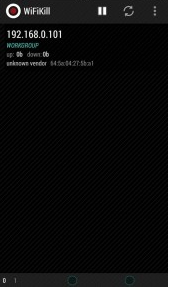
✰ Click on IP Address & It will open a new window from here, Now Click on “
Grab” Button, After that Click on “
Kill” Button.
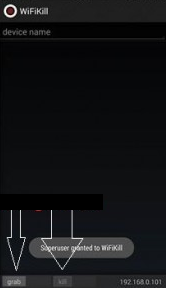
✰ That’s all you are done, now your friends will not able to use WiFi connection, They will still connect to WiFi but they will get speed like
0 Kbps & Can’t able to browse or download anything.
For Revert Back
✰ Untick on “
Grab All” Button, After that Click on “
Kill” Button
✰ Then Go-to Main Screen Of app & Click on “
❚❚” Symbol Normally
✰ Now Your friends , Neighbors can use WiFi Normally as before they was using this.
 UC Browser, Faster Download! Click Here!
airtel 3g trick 2015, android, aircel trick vodafone free net tricks bsnl 3g tricks fileice survey bypass tricks reliance trick free recharge tricks idea UDP trick paytm mobikwik coupons discounts freecharge free recharge android apps, Free recharge tricks, premium accounts , pd proxy, finchvpn trick, 50rs 100rs cashback , check your own number operators , networks tricks, Unlimited Free Recharge Trick (2015) , Paytm Pay 5 Get 10 Cashback [Latest], IDEA 3G UDP Trick, TCP Tricks , Airtel 3G UDP Trick AirTel 3G Free Internet Vpn Trick Vodafone 3G Vpn Free Premium Internet Trick, Missing Tricks - The Tech Zone , Free Recharge Free Gprs Aircel Airtel Bsnl Idea Reliance Vodafone Hot Deals Amazon Ebay Paytm Android Tricks WhatsApp Tricks Facebook Tricks , sms tricks , calling tricks , facebook hacking tricks Watch IPL 2014 Live Streaming Online Free,Watch IPL 2015 Match Live on Mobile ,Indian Premier League 2015 (IPL 8) Live Cricket Stream Online Free,High Quality IPL Streaming, IPL 2015 Live Streaming Season 8 on Set Max TV Channel. Watch Live IPL Streaming Free broadcast Video,Full IPL 2015 Matches Free Online Watch IPL 2015 Live Streaming Online Free,Watch IPL 2015 Match Live on Mobile ,Indian Premier League 2015 (IPL 8) Live Cricket Stream Online Free,High Quality IPL Streaming, IPL 2015 Live Streaming Season 8 on Set Max TV Channel. Watch Live IPL Streaming Free broadcast Video,Full IPL 2015 Matches Free Online